
A study desk that keeps its appointments.
Pick a class, set a starting point and a study time. At that time the desk rings, a lesson your own AI tutor wrote from primary documentation is already waiting, and the screen is yours again when the check is done. Understand deeply, practice daily.
- MIT licence
- your keys stay on your machine
- nine classes, and your own
- every lock has five ways out
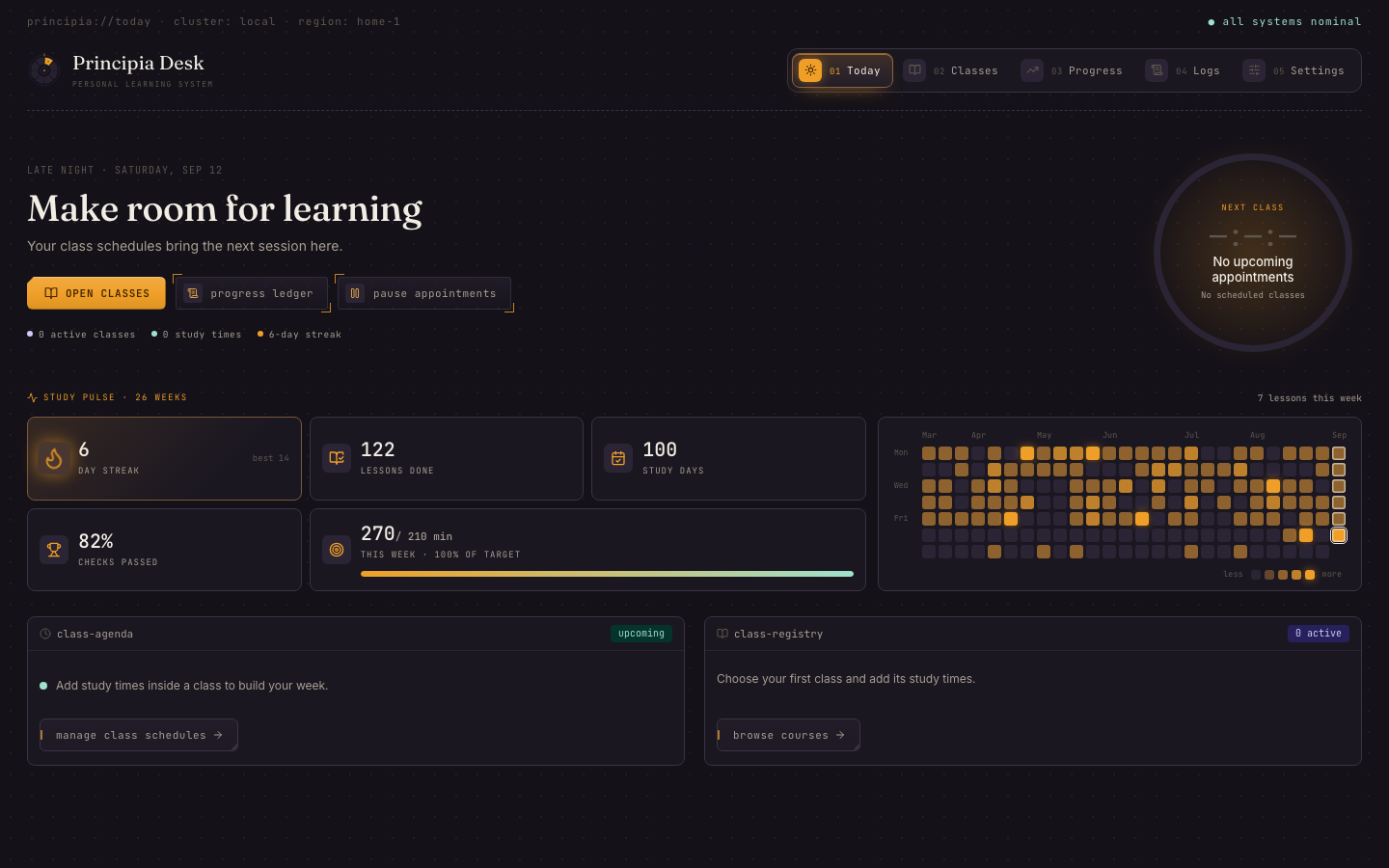
The lesson is written before the bell.
Nothing here waits for you to feel like it. A study time is an appointment; the desk prepares for it ahead and holds the door open.
- 01
The desk prepares
Twenty minutes before a study time, the tutor plans the next topic on your route, fetches the sources the curriculum names and writes the lesson, sized to the minutes you gave that day.
- 02
It rings
A notification and an alarm that snoozes but never dismisses. The menu bar icon, or the tray, says what is due. Nothing rings until the lesson is actually ready.
- 03
You read
Point form with reading hints, labelled callouts, diagrams, and a section rail that stays in view. Fourteen minutes of a thirty-minute session.
- 04
You practise
A stepper of concrete steps and a done-when, with a workspace that saves every keystroke and a tutor you can ask about this lesson.
- 05
You are checked
Questions grounded in what you just read. What stuck is marked; what did not comes back as retrieval on a later day. Then the desk lets go.
Every class starts where you already are.
Start from scratch, declare a stage with the topics you know, or take a placement check that samples every stage three times. The result is a personal path, revised whenever you change your mind.
- LBLinux Bashthe interactive shell
- BSBash Scriptingreusable tools
- JSJavaScript & Browserruntime and platform
- TSTypeScripttypes as design
- FAFrontend Architecturestate, rendering, boundaries
- DTDeveloper Toolingbundlers, parsers, protocols
- SDSystem Designdistributed systems
- DEGermanA1 to B2, 40 scenarios
- ITItalianA1 to B2, 40 scenarios
- +Your owndrafted by your tutor, edited by you
Each engineering course is a curriculum of topics with stages, prerequisites and two or more primary sources per topic. Lessons are taught from pages the desk fetched from those sources, not from a model's memory.
Written for the session you gave it.
A lesson is sized to its study time: fourteen minutes of reading, ten of practice, six of check at thirty minutes; longer days hold several whole topics with a short break between them and retrieval on earlier topics afterwards.
Every lesson names its sources and cites them. A page that could not be fetched is said so, and the reading list keeps the link the curriculum meant, marked as unreachable, rather than inventing one.
Everything is saved as you go: the reading position, the practice steps you ticked, the answers you have not submitted yet. Close the lid and come back.
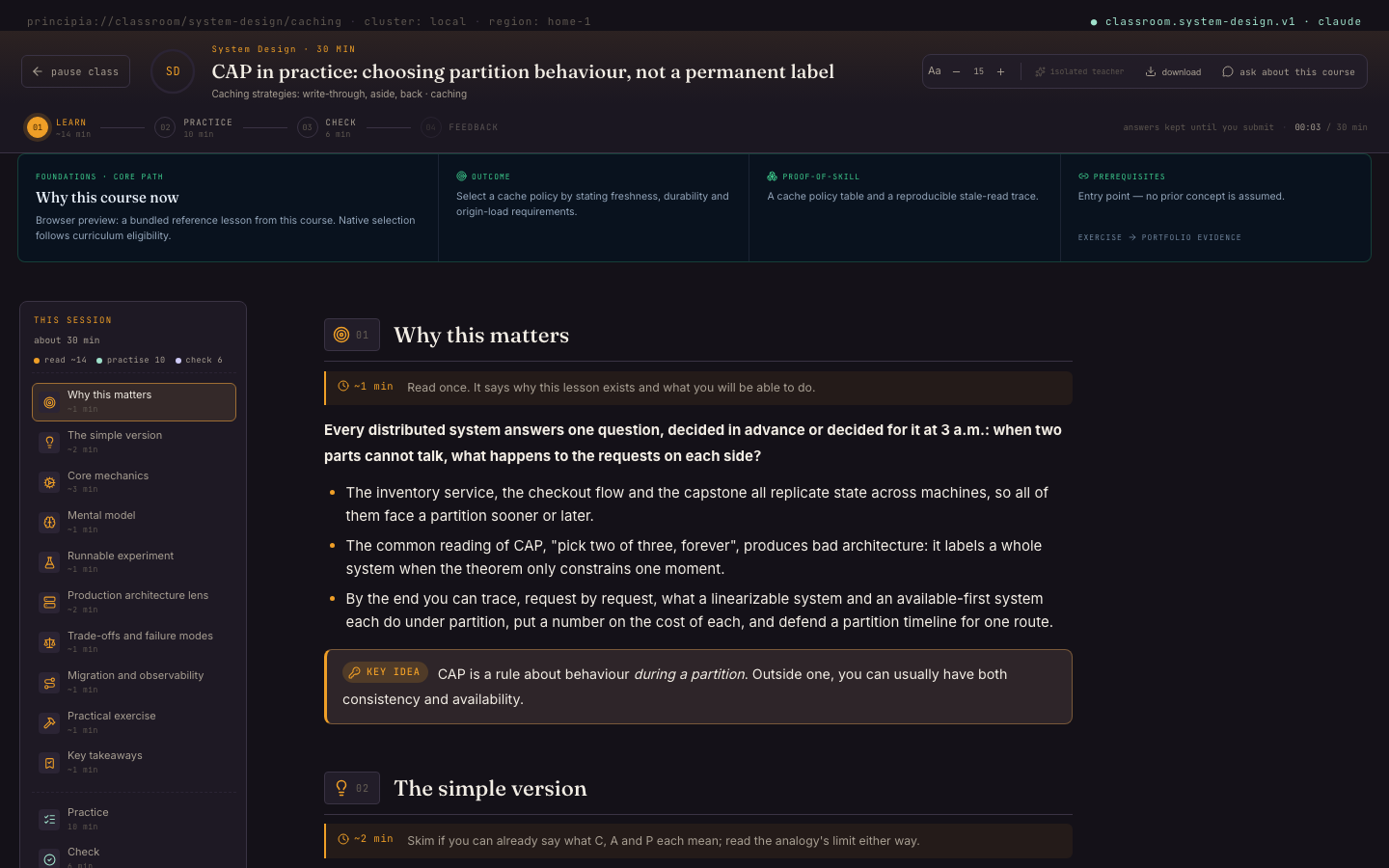
Built to be honest about progress.
Declared familiarity never awards completion. A skipped check is a skipped check. The denominators on the curriculum are the ones you would want if you were paying for this.
Your own tutor
Claude Code, Codex, Cursor Agent or Gemini CLI you are already signed in to; a key for Anthropic, OpenAI, Google, OpenRouter, Groq, Mistral or DeepSeek; or Ollama on this machine. A tutor per class if you like.
Primary sources, fetched
Each course allows a set of documentation hosts. The desk fetches the pages, hands the tutor only what it retrieved, and falls back to mirrors when a host goes dark.
Placement that measures every stage
Three questions per stage, so no stage is skipped on a lucky answer. Unit challenges let you check out of what you already know, on evidence.
Study times with their own shape
Each weekday on a rule can have its own start and its own length. Appointments are durable: due at their time, missed once the day passes, made up or skipped by you.
Retrieval and bridges
Topics come back when their review is due, without a provider. A failed check on a topic whose prerequisite you set aside proposes a short bridge lesson.
Lessons you can keep
Any lesson downloads as a PDF or a CSV with its questions, filed by class under Documents. Your profile exports and imports whole, and the desk updates itself.
Lessons you can hear
A class can ask for each lesson as a conversation between a teacher and a student, voiced on your machine: the system voice, Piper, Kokoro or VibeVoice, with the voices you chose.
Always on, never nagging
A menu bar or tray desk that says what is due and what comes next. The platform's own scheduler, launchd, systemd or Task Scheduler, wakes the desk at every study time, and on wake or next login if it missed one.
Classes of your own
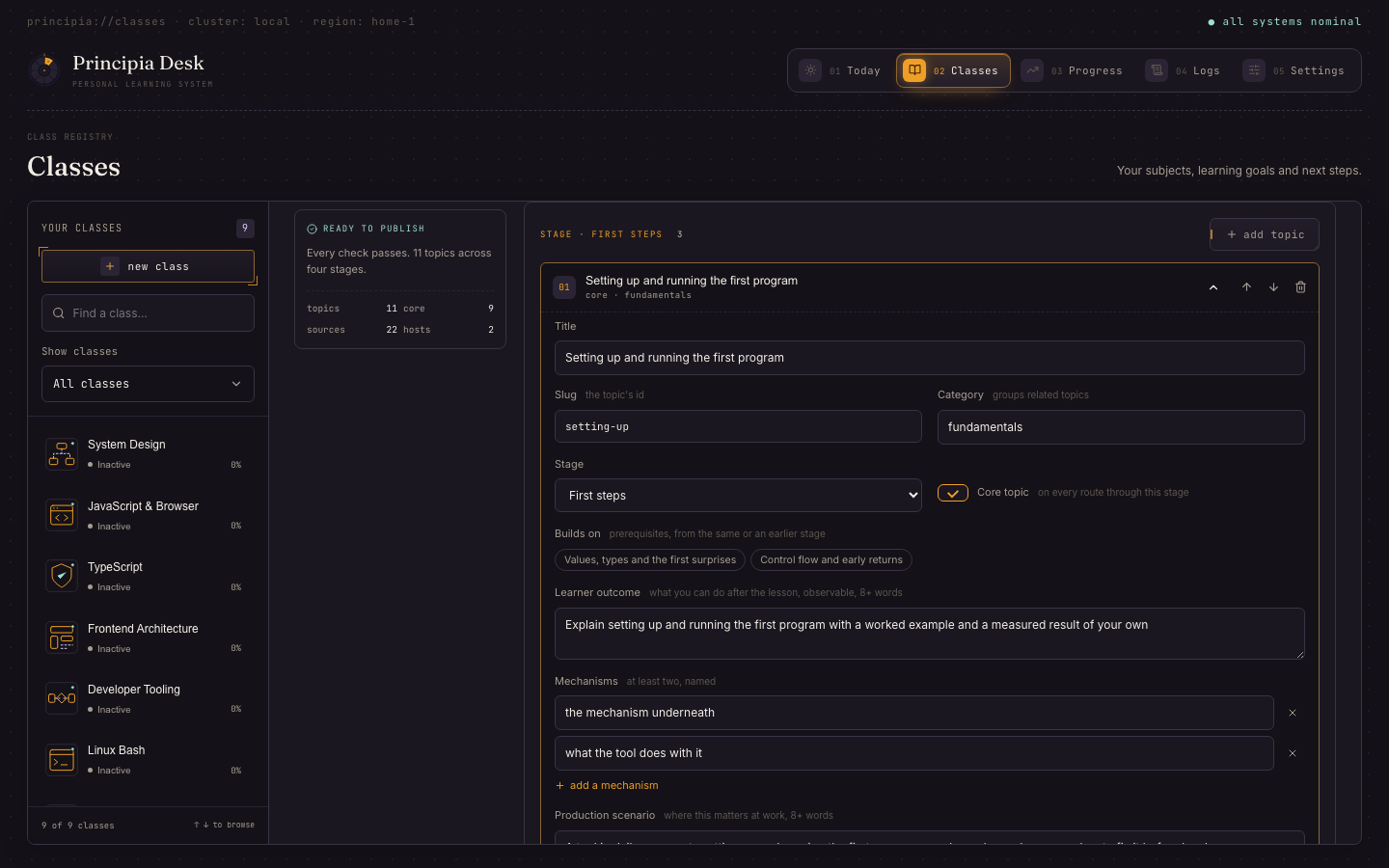
Tell the desk what you want to be able to do. The tutor drafts the curriculum, reads it back, writes the question bank; you edit until it reads right and enrol like any class.
Logs you can read
Every line a runner reports while preparing a lesson is kept for thirty days, run by run, so a failed preparation has a cause you can see.
Say what you want to be able to do. The tutor writes the course.
A brief in your own words: a title, the outcome, what you already know, the documentation you trust. The tutor returns four stages and twelve to thirty-six topics, each with an outcome, the mechanisms, a production scenario, misconceptions and two primary sources, held to the same validator as the bundled curricula.
Edit every topic on a card. Ask the tutor to read the draft back. Fetch every source. Have it write a placement bank. Publish, and the class is any class: study times, lessons prepared ahead, retrieval, PDFs, enforcement.
Export a class as one file and hand it to someone else's desk.
A lock you set for yourself, and can always undo.
Each class carries a focus policy. The strict one blocks application switching, Force Quit and logout while a lesson holds the desk, as far as the platform lets an application do that, so it must never be the only thing between you and your own machine. There are five ways out, on every platform, and none of them needs a terminal.
- 01Advisory
The window comes to the front at the study time. Nothing is blocked.
- 02Focused
Full screen, always on top, focus snaps back every 300 ms, other displays are sealed, media is paused. Switching away is useless; nothing at the system level is disabled.
- 03Strict
Also blocks application switching, Force Quit, logout and shutdown while the lesson holds the desk. macOS hands an application that much; Windows and Linux do not, so there strict holds the desk the way focused does.
- 01Finish the check
The ordinary way. The lesson ends and the desk lets go.
- 02Break glass
A long phrase you set during onboarding, rendered non-copyable. Typing it pauses the lesson with its work kept and releases the lock.
- 03The recovery console
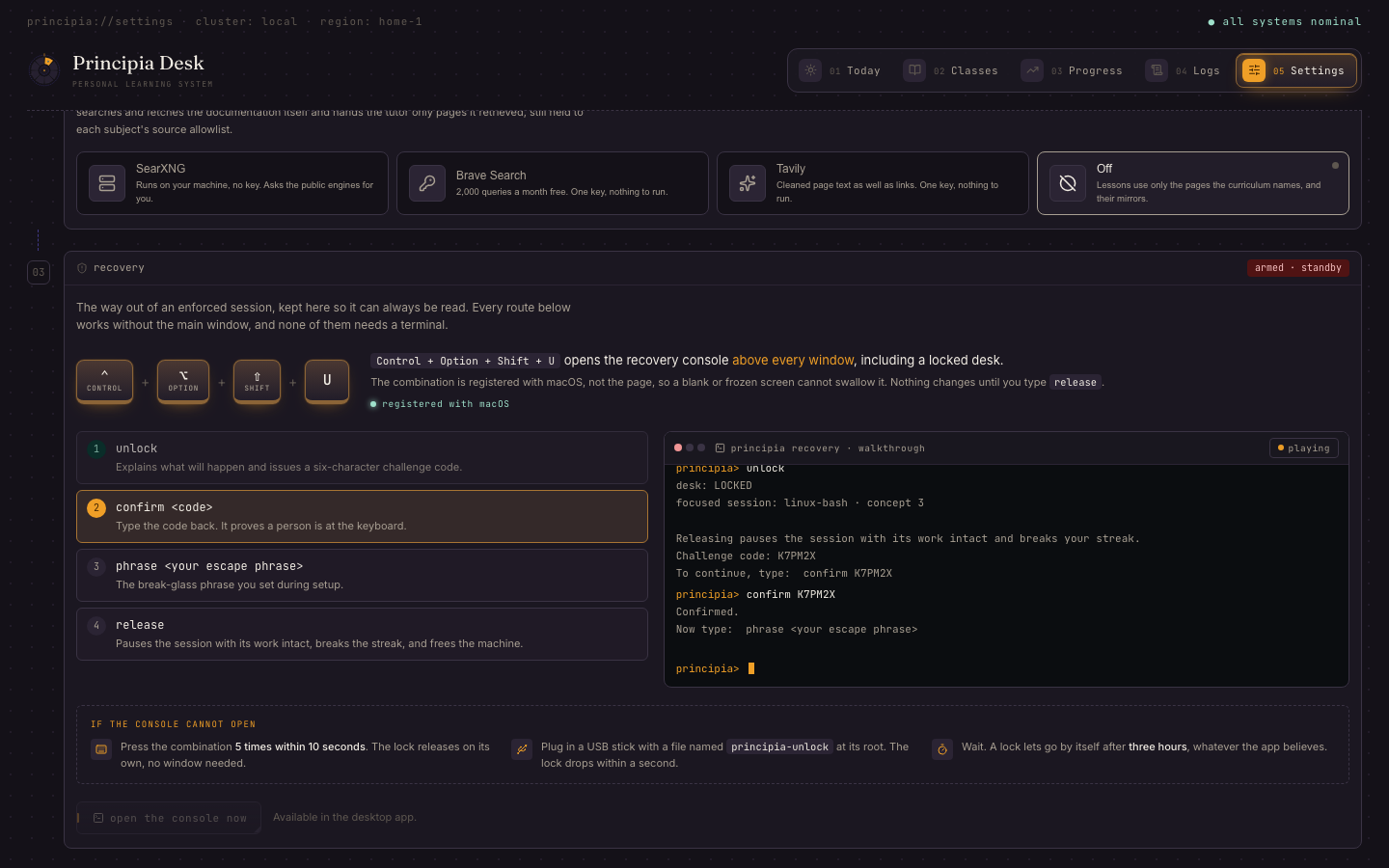
A system-wide key combination opens a console above every window, even a blank one. Four commands in order (
unlock,confirm,phrase,release) end the session; five presses in ten seconds release it even if the console cannot open. - 04A release token
A file named
principia-unlockin your home folder, in/tmp, or at the root of any mounted volume. Keep a USB stick by the desk. - 05The dead man's switch
A lock lets go by itself after three hours, whatever the app believes. No lesson runs that long.
The kiosk refuses to engage until the interface reports ready, so a broken build cannot hold a lock. This rule has a history: an early version of the roulette bricked a colleague's laptop until he booted into Recovery. Every release since is held to it.
The ways out, where you can always read them.
Onboarding teaches the recovery console with a walkthrough that plays the four commands through. Settings keeps the same guide, with the keys as they read on this machine and whether the system took the combination.
The README documents every route, including the ones for a build so broken it cannot draw a window.
Ten minutes to the first appointment.
Two ways in: the installer for your platform from the latest release, or a checkout if you would rather read it first. The desk talks to your tutor, to the documentation hosts a course allows, and to nothing else.
Latest releasev0.2.8· 22 Sept 2026· 7 installers
One file per platform, built by the release pipeline from the tagged commit. Unsigned for now: each platform asks once before the first launch, and the step says what to click.
- 01
Download the installer for your machine
Each link goes straight to the file on the latest release.
macOS · Apple Silicon (M1 and later)Principia.Desk_0.2.8_aarch64.dmgApple Silicon disk image · 14.7 MBmacOS · IntelPrincipia.Desk_0.2.8_x86_64.dmgIntel disk image · 15.4 MBNot sure which Mac you have? Apple menu › About This Mac: a chip that says Apple is Apple Silicon; a processor that says Intel is Intel.
Windows · installerPrincipia.Desk_0.2.8_x64_en-US.msiMSI installer · 12.6 MBWindows · setup program, if the MSI is refusedPrincipia.Desk_0.2.8_x64-setup.exeSetup program · 9.4 MBLinux · Debian, UbuntuPrincipia.Desk_0.2.8_amd64.deb.deb for Debian and Ubuntu · 16.0 MBLinux · Fedora, openSUSEPrincipia.Desk-0.2.8-1.x86_64.rpm.rpm for Fedora and openSUSE · 16.0 MBLinux · any distributionPrincipia.Desk_0.2.8_amd64.AppImageAppImage for any distribution · 89 MB - 02
Open it
macOSOpen the disk image and drag Principia Desk to Applications. The first launch is right-click › Open, because the app is not notarised; macOS remembers after that.
xattr -dr com.apple.quarantine "/Applications/Principia Desk.app"The macOS command is the same permission in one line, for a machine where right-click › Open is not offered.
WindowsRun the MSI. SmartScreen says it protected your PC: click More info, then Run anyway. The setup program does the same thing with a different wrapper.
Linuxsudo apt install ./Principia.Desk_*_amd64.deb # or: sudo dnf install ./Principia.Desk-*.x86_64.rpm # AppImage: chmod +x Principia.Desk_*_amd64.AppImage && ./Principia.Desk_*_amd64.AppImageapt may end with a notice that the file could not be accessed by user _apt: that is its sandbox talking about a download it did not need. The lines above it, Setting up principia-desk, are the install succeeding.
- 03
Set up the desk
Four steps on first launch: the tutor, an optional search engine for tutors that cannot browse, your break-glass phrase with the recovery walkthrough, deploy. Then choose a class and a starting point, add a study time, and the class is armed.
Control + Option + Shift + U- The recovery console, from anywhere, if a lock ever needs releasing. Ctrl + Alt + Shift + U on Windows and Linux.
~/principia-unlock- A file or folder by that name in your home, or on the root of any mounted volume, releases a lock within a second.
From 0.2.1 the desk updates itself: Settings › Updates shows a newer version with its notes and installs it on request, after checking the release's signature; the profile and its history stay where they are. A desk on 0.2.0 takes the new installer over the old one once. The full guide, including the upgrade from System Design Roulette, is in the install page.
Everything the release does, on your machine, in about ten minutes the first time.
- 01
Get the source
git clone https://github.com/dark-matter08/principia-desk.git cd principia-desk npm install - 02
Run it against a dev server
Hot reloads the interface; the Rust side rebuilds when it changes.
npm run tauri dev - 03
Or build the app
macOSnpm run tauri build -- --bundles app cp -R "src-tauri/target/release/bundle/macos/Principia Desk.app" /Applications/Windowsnpm run tauri build -- --bundles msi,nsisLinuxnpm run tauri build -- --bundles deb,rpm,appimageThe bundles land under src-tauri/target/release/bundle/. The release workflow runs exactly these commands, plus an hdiutil script for the disk images.
npm run check && npm test- The frontend gates: the catalogue check, svelte-check and the unit tests.
cd src-tauri && cargo test- The Rust suite, three hundred tests, most of them against a fresh SQLite database.
How the code is laid out, what the gates are and how a change is proposed: contributing.
Things people ask first.
Is it free?+
Yes. MIT licence, no account, no telemetry. You pay your tutor's provider, if it charges, or run Ollama for nothing.
Where does my data live?+
In a SQLite database in the app's data directory: ~/Library/Application Support/com.darkmatter.principia-desk/ on macOS, %APPDATA%\com.darkmatter.principia-desk\ on Windows, ~/.local/share/com.darkmatter.principia-desk/ on Linux, backed up before every schema upgrade. Settings › Your data exports the whole profile as one file and imports it on another machine. Keys live in your system's secret store (the Keychain, the Credential Manager, the Secret Service), or in a private file in the profile where no store answers.
What does the tutor see?+
The topic, its curriculum brief, your goal, your progress on that class and the pages the desk fetched. Never your keys, your escape phrase or other classes.
Can I really always get out of a lock?+
Yes. Five documented routes, none needing a terminal, and the kiosk refuses to engage at all until the interface has reported ready. See the Enforcement section above.
Does it work on Windows or Linux?+
Yes. Every release carries installers for macOS, Windows and Linux, and the desk is the same on each: the classes, the lessons, the study times on the platform's own scheduler, the alarm, the tray, the recovery hot key and the release token. One difference: macOS lets an application block Cmd+Tab and Force Quit, so strict enforcement does that there; on Windows and Linux strict holds the desk the way focused does.
Can I make a class for something you do not ship?+
Yes. Classes › New class. Your tutor drafts the curriculum, you edit it, the desk validates and publishes it. Export it as a file to share.
What became of System Design Roulette?+
This. Same database, same visual character, a different shape: classes you schedule instead of one daily roulette. The changelog tells it.
How do I report a lockout bug?+
Privately, as the security page asks. Ordinary bugs go in the issue tracker.
Make room for learning.
One class, one study time, and the desk does the rest. It is open source; read it before you trust it.